
Apps Built on MV
Applications designed to solve real-world problems - starting on Martha's Vineyard and extending wherever they're needed.
Is the Ferry Running Today?
Check delay and cancellation likelihoods before you travel.
Not official schedules. Just better expectations.
Some delays expected due to wind conditions
Gusts to 33 mph • Choppy seas
In the past 7 days on this route
Steamship Authority operating on schedule
No current weather advisories
Some delays expected due to wind conditions
Gusts to 33 mph • Choppy seas
Live island utility • Public-facing • Used daily
The Problem
Ferry schedules on Martha's Vineyard are technically published, but they don't tell you what you actually need to know: whether your boat is likely to run. Weather, wind, and operational issues cause delays and cancellations that catch travelers off guard. The official sources update reactively. By the time you know, you're already at the dock.
The Solution
IsTheFerryRunning.com aggregates weather data, historical cancellation patterns, and operator status into a single view. It doesn't replace the official schedule—it gives context. Users can see wind conditions, recent route performance, and a plain-language risk assessment before planning their day.
Who It Helps
Year-round residents checking morning commutes. Contractors scheduling off-island pickups. Visitors trying to make a flight. Property managers coordinating cleaners. Anyone whose day depends on whether that boat actually leaves.
Why This Matters
This is the kind of software we believe in: small, focused, and genuinely useful. It doesn't try to be everything. It solves one problem well. We built it because we needed it, and we operate it because others do too.
Plant marketplace • Peer-to-peer • National reach
The Problem
A huge number of growers sell plants through Facebook groups and Instagram because there's no better option. While those platforms work at a basic level, they weren't designed for commerce. Payments happen in private messages. Inventory is tracked manually. Scams are common. There are no seller tools, no analytics, no structured reviews, and very little accountability when something goes wrong.
For growers, selling online often means taking on risk, extra admin work, and a lack of protection. For buyers, it means trusting strangers with no real way to assess reliability.
The Solution
BloomHub is a marketplace built specifically for growers and gardeners. It centralizes the tools needed to sell plant materials such as tubers, seeds, cuttings, and bare roots in one place.
Growers can list products, manage inventory, track sales, and ship orders through a dedicated seller dashboard. Buyers can browse available plants, purchase securely, and participate in a two-way review system that builds accountability and trust on both sides.
Payments are handled through Stripe, providing buyer and seller protections that simply don't exist in social media transactions.
Who It's For
BloomHub is designed for:
- Small and independent growers who want to sell without building and maintaining their own website
- Gardeners looking to buy directly from real growers
- Communities where trust, reputation, and transparency matter
- Sellers who want real tools instead of spreadsheets and DMs
It lowers the barrier to selling while raising the standard for how transactions are handled.
Why It Was Built
BloomHub started as a solution to a real problem observed over years of watching growers struggle with existing platforms. It was built by listening closely to growers, iterating alongside early users, and focusing on trust, usability, and community rather than scale for scale's sake.
It's now a fully functioning MVP, actively used by early growers and buyers, and continues to evolve based on direct feedback from the people it's built for.
Like many projects at MV App Studio, BloomHub exists because the problem was real, persistent, and worth solving.
School scheduling • Visual mapping • K-12 administration
The Problem
School administrators waste time cross-referencing spreadsheets to answer simple questions like "Where is Mr. Johnson right now?" Guidance counselors are interrupted dozens of times per day. Room conflicts often go unnoticed until two classes arrive at the same door.
The Solution
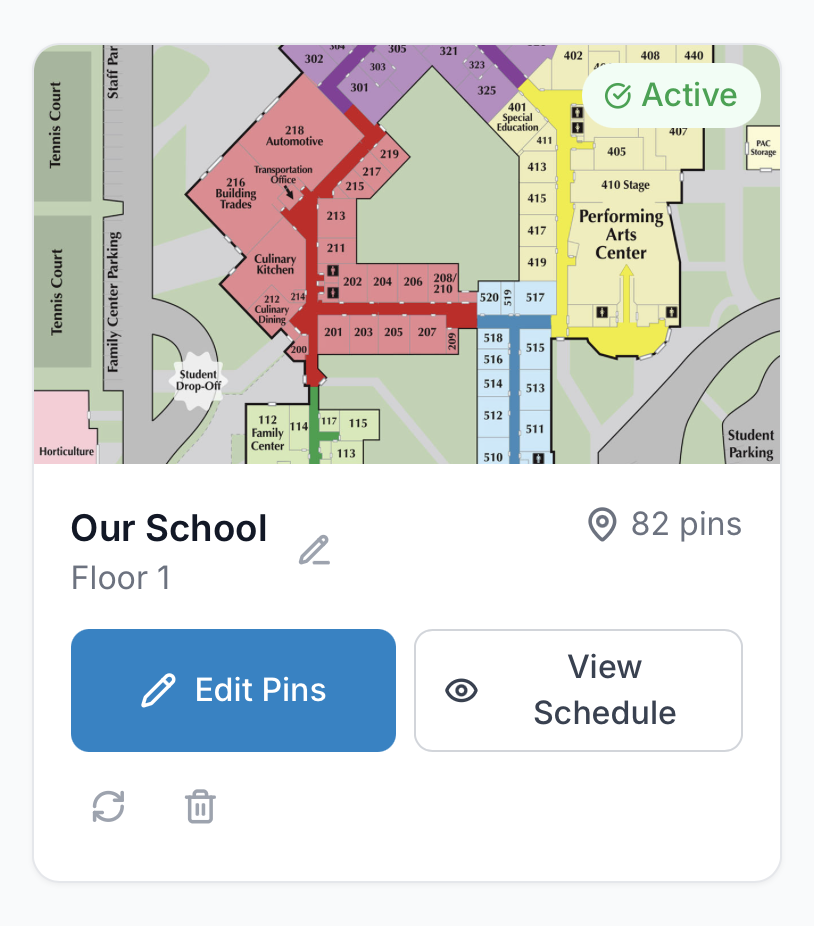
ClassMap overlays schedule data directly onto school floor plan images, showing real-time room occupancy at a glance. Staff can instantly see which rooms are in use, locate any teacher, and identify scheduling conflicts before they become problems.
Who It Helps
K-12 administrators, guidance counselors, and school staff who need to quickly understand building usage without digging through schedules. Anyone who has ever been asked "Where is this teacher?" or "Is that room available?" and had to check multiple sources to answer.
Why It Was Built
ClassMap bridges the gap between abstract schedule data and physical building layouts. It transforms school schedules into interactive, visual building maps - turning information that already exists into something immediately useful.
Ride organization • Community building • Cyclist networking
The Problem
Group rides are scattered across text threads, Strava clubs, Facebook posts, and word of mouth. New riders struggle to find local groups. Ride leaders have no reliable way to know who is actually showing up. Traveling cyclists arrive somewhere new and have no clear way to discover active clubs or meet other riders.
There is no central, structured system for organizing real-world cycling communities.
The Solution
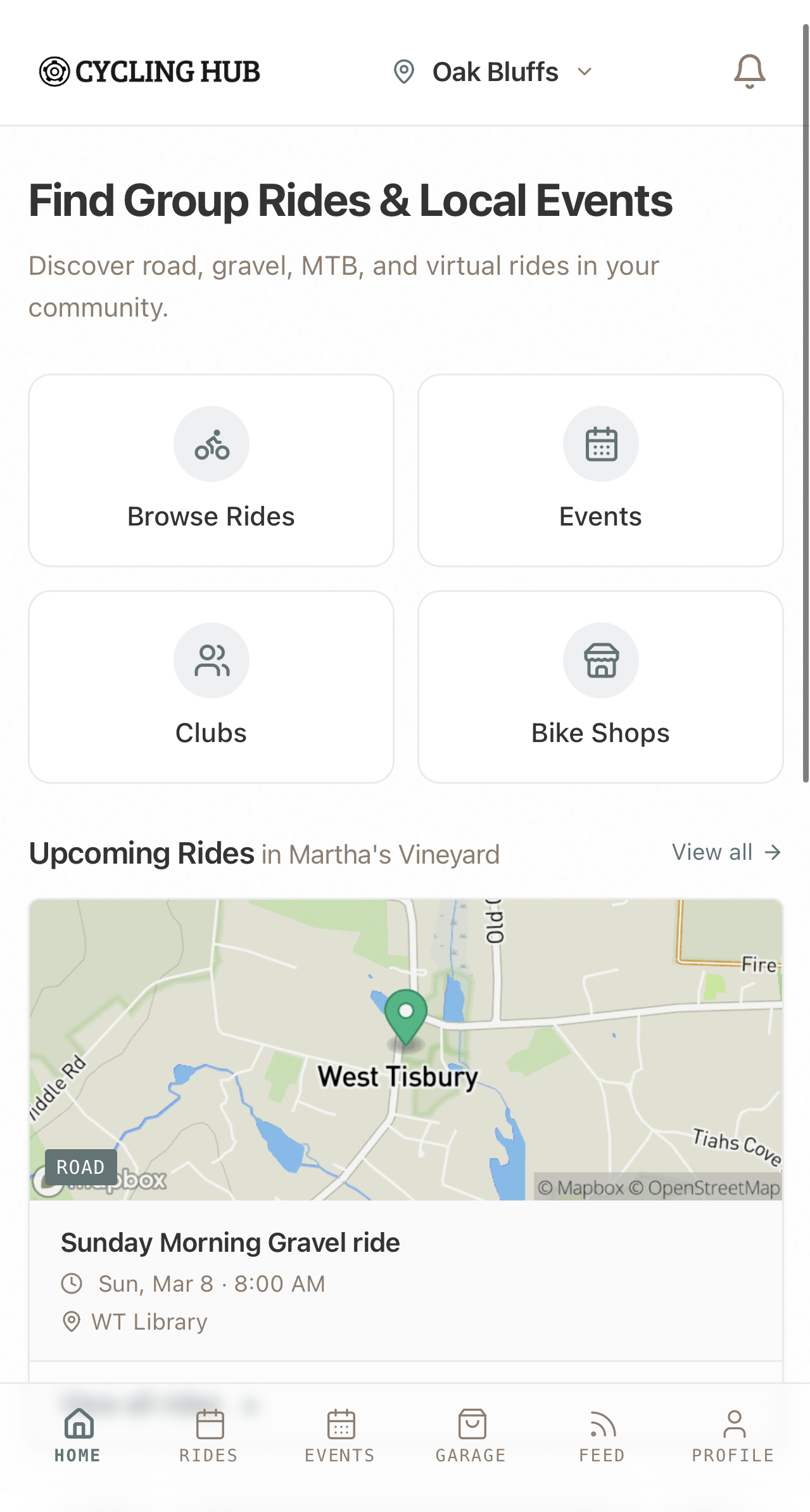
Cycling Hub centralizes local ride organization into one clean platform. Ride leaders can post events, track attendance, and manage details in advance. Riders can discover clubs near them, RSVP to rides, and receive notifications when new events are posted in their area.
Strava integration allows riders to verify their cycling identity, building trust and transparency within the community - while keeping personal activity data private unless they choose to share it.
Who It Helps
Cycling clubs, local bike shops, ride leaders, and everyday cyclists who want a better way to organize and participate in group rides.
It also helps traveling riders who want to connect with local cycling communities wherever they go - without relying on fragmented social media posts or insider knowledge.
Why It Was Built
Cycling Hub was built to strengthen local cycling communities. It transforms disconnected ride planning into a streamlined, discoverable system that makes it easier to get people out riding together.
The goal is simple: increase participation, improve organization, and help cyclists connect - locally and beyond.

Media streaming • Personal control • Cross-device
The Problem
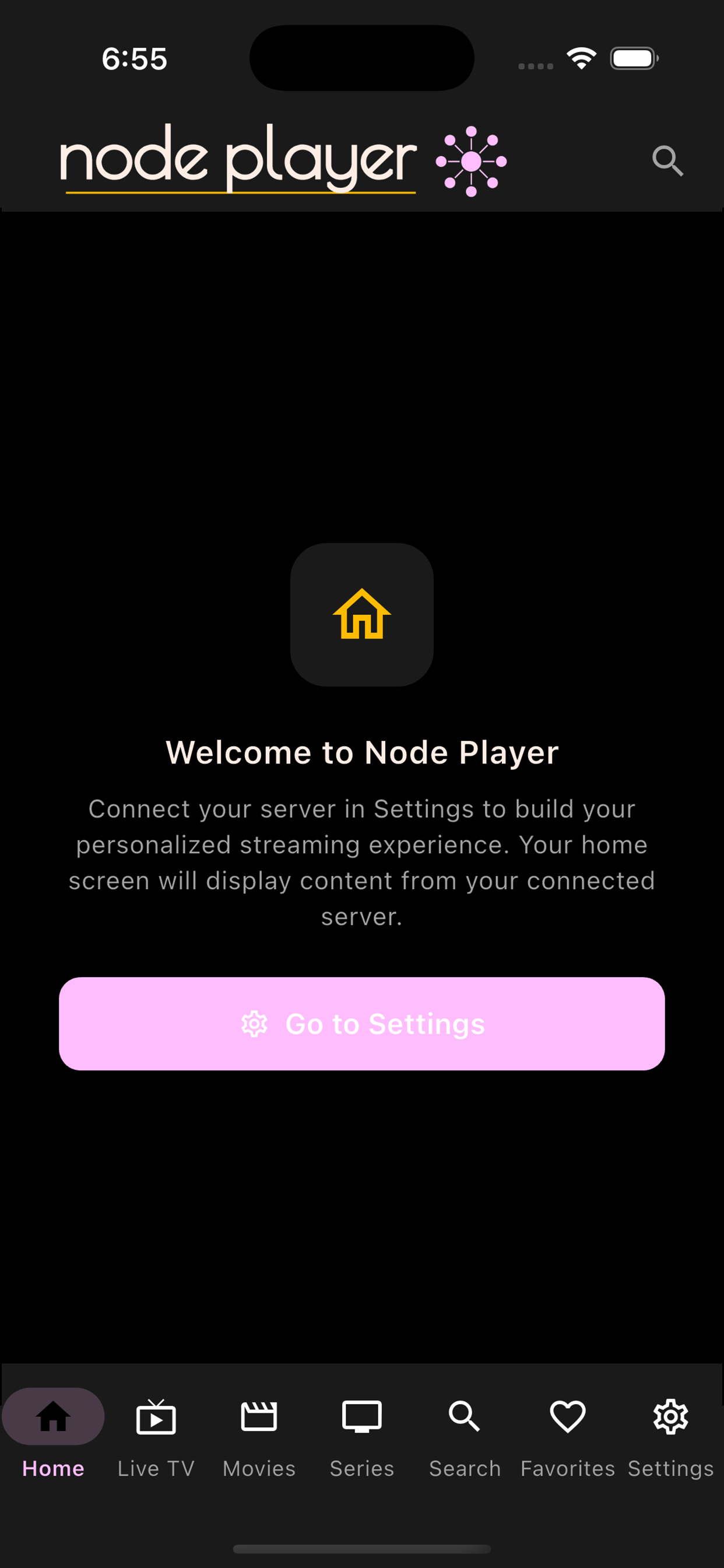
Streaming media from personal servers has traditionally required clunky interfaces, complicated setup processes, and apps that prioritize features over usability. Users who want control over their own content libraries are often stuck with outdated tools or forced to rely on platforms that don't put them in charge.
The Solution
Node Player is a powerful media player designed to give users full control over their streaming experience. Connect your own media sources, organize your content, and enjoy reliable playback across devices with a clean, modern interface.
Built with performance and simplicity in mind, Node Player focuses on delivering a fast, flexible streaming solution while keeping the user in control of their media.
Who It Helps
Users who run their own media servers and want a polished client experience. Cord-cutters who manage personal content libraries. Anyone who values privacy, ownership, and control over their streaming setup without sacrificing a modern, intuitive interface.
Why It Was Built
Node Player was built because existing solutions either look outdated, are overly complicated, or lack the polish expected from a modern iOS app. The goal was simple: create a media player that respects the user's intelligence, works reliably, and looks as good as it performs.
All Clients
Office network, 12 devices
Wi-Fi mesh, Synology NAS
Microsoft 365, security
Mobile devices, MDM
POS, guest Wi-Fi
A Private CRM That Lives In Your Google Drive
Your CRM. Your Data. Your Google Drive.
Manage clients, notes, credentials, invoice reminders, and service history from a modern mobile app while maintaining ownership of your database. ClientsDesk helps professionals across many industries keep client information organized — without handing it over to a CRM vendor.
- Client records and service history
- Secure credential management
- Notes and invoice reminders
- Google Drive / spreadsheet-powered database
- Offline access and sync
- User-owned data, not server-hosted CRM storage
The Problem
Professionals who manage clients — property managers, realtors, contractors, consultants, service businesses, and many others — often keep notes, credentials, service records, and invoice reminders scattered across spreadsheets, notes apps, password managers, and memory. Traditional CRMs are often too generic, too expensive, or store sensitive client data on third-party servers.
The Solution
ClientsDesk gives any client-based business a focused, private CRM built around the way real client work actually happens. Client records, notes, credentials, and invoice reminders are organized in one mobile app while the underlying CRM database lives in the user's own Google Drive — not on a vendor's servers.
Who It Helps
Property managers, realtors, contractors, consultants, service businesses, small business owners, IT professionals, and anyone running a client-based business that needs fast access to client records, notes, credentials, and service history.
Why It Was Built
ClientsDesk was built to solve a real workflow problem: keeping client information organized, portable, private, and accessible in the field. The goal is to give professionals and service businesses a simple CRM they can actually use — without surrendering ownership of their data to a vendor.
Daily menu management • Farmers markets • Small vendors
The Problem
Farmers market vendors, bakers, makers, and small food producers change what they bring to market every single day. Today's lineup depends on what was baked overnight, what's in season, what sold out last weekend, or what came out of the kitchen this morning. Writing a fresh chalkboard, printing a one-off menu, or telling every customer the same list of substitutions takes time vendors don't have on a busy market morning.
The Solution
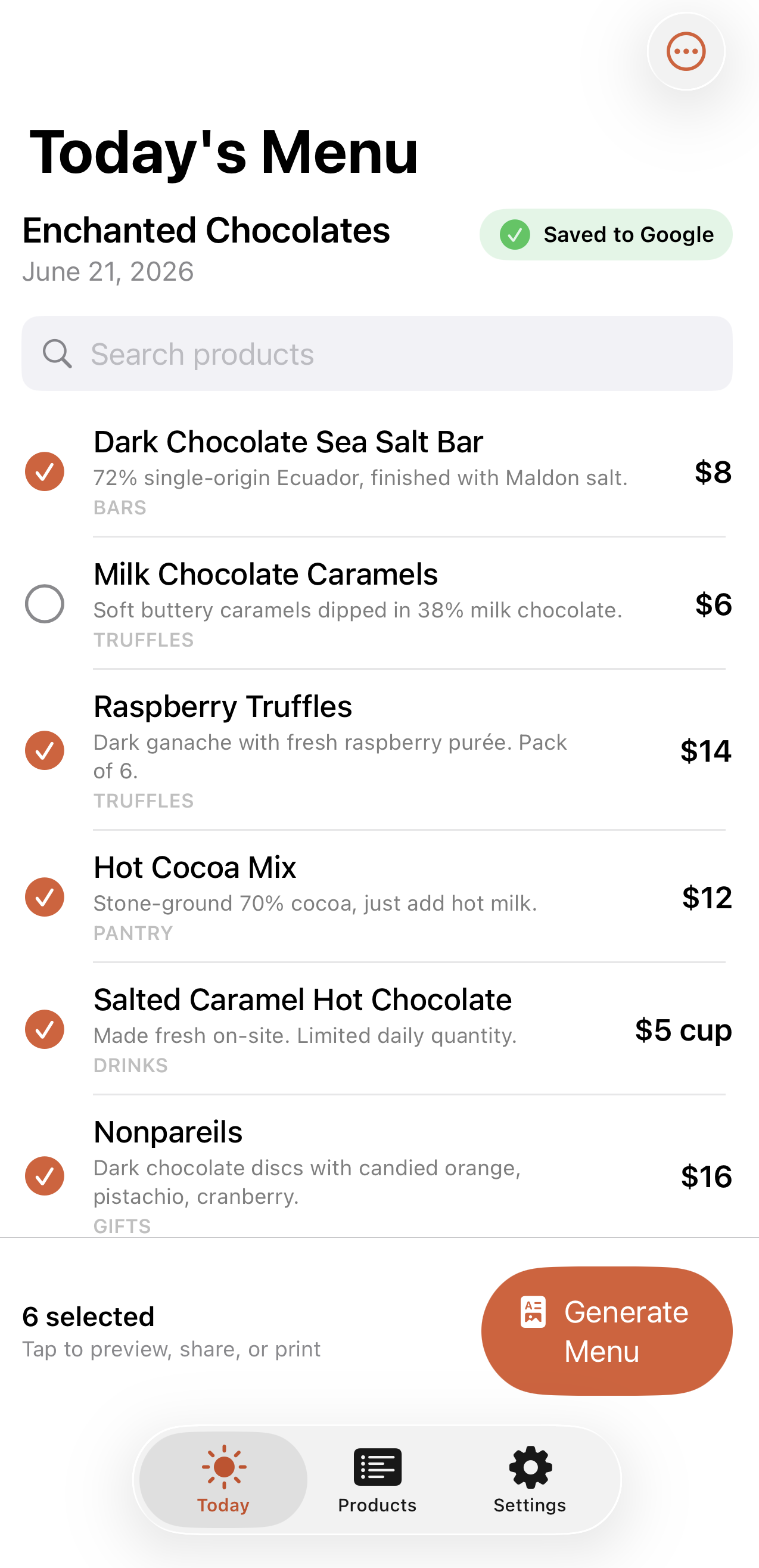
Daily Menu Maker turns the daily menu into a few taps. Vendors keep a master list of products with descriptions and prices, then check off what's available today and tap one button to generate a clean, printable, shareable menu. The result looks polished enough for a storefront and saves automatically to the vendor's own Google account.
Who It Helps
Farmers market vendors, bakeries, coffee shops, food trucks, chocolatiers, jam makers, soap makers, prepared food sellers, and any small business with a rotating daily offering. Anyone who has ever rewritten the same chalkboard for the tenth Saturday in a row.
Why It Was Built
Daily Menu Maker was built to remove a small but persistent piece of friction from the mornings of small vendors. It is a focused tool for a specific job: pick today's offerings, generate a clean menu, and get back to running the booth.

macOS security • Built-in VPN • Privacy toolkit
The Problem
Staying secure on a Mac usually means stitching together several apps: a VPN from one vendor, a malware scanner from another, and a grab-bag of privacy and cleanup utilities on top. Worse, many consumer VPNs quietly share one connection identity across all their users and ship without a working kill switch — so when the tunnel drops, your real traffic leaks without you ever knowing.
The Solution
Node Guardian brings it all into one native macOS app. A built-in WireGuard VPN gives each install its own unique encryption key — generated on your Mac and never shared — with a real kill switch that blocks traffic if the tunnel drops and DNS leak protection that forces lookups through the tunnel. Alongside the VPN, it adds threat and malware scanning, quarantine, real-time monitoring, and a clear security score, so you can see exactly how protected you are.
Who It Helps
Privacy-conscious Mac users, remote workers, frequent travelers, and anyone who regularly connects over public or untrusted Wi-Fi. Node Guardian is for people who want strong, understandable protection without becoming their own security team.
Why It Was Built
Node Guardian was built because good Mac security shouldn't require assembling a toolkit or trusting a VPN that fails open. The goal was a single, honest app that keeps your traffic encrypted, your keys your own, and your Mac clean — with security that fails closed, the way it should.
Interested in how we approach building software? See examples of the systems we create for local businesses.
View What We Build →